
A named admin, a ticket queue, a flat monthly bill.
The platform keeps working after go-live, and somebody who knows your org is responsible for it.

Watch
Why leaders trust Micronetbd: Michelle Fry, General Counsel and VP at SchoolStatus
Michelle Fry, General Counsel and VP at SchoolStatus, on what it is like to have Micronetbd run the platform.
6:41 on the Micronetbd channel
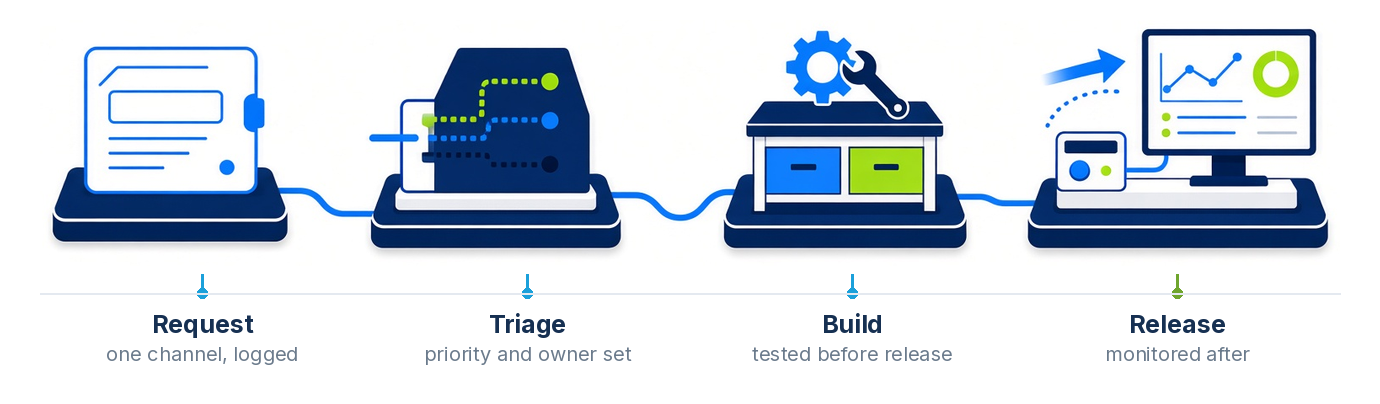
More videos on this pageRequest, triage, build, release
Six things you stop worrying about
A named admin
One person who knows your org, not a rotating queue of strangers reading your ticket for the first time.
A ticket queue with an SLA
One channel of record, a response time you can hold us to, and a history you can audit.
Monitoring
Integrations, automation and sync watched, so failures reach us before they reach your team.
User training
New starters trained, and refreshers when a process changes or a feature lands.
Monthly enhancements
A block of build time every month, so small improvements happen instead of piling up.
Release management
Platform releases reviewed against your build before they land, not after something breaks.
The alternative, honestly
Most firms try one of these first.
Hiring an admin in-house
- Hard to hire, harder to keep
- One person, so holidays and exits are outages
- Skills cover one platform, not the stack you run
- Salary whether the month is busy or quiet
- Nobody to escalate to when it is genuinely hard
A subscription with us
- Live in days, not a hiring cycle
- A named admin with a team behind them
- Filevine, Salesforce, Litify, DocuSign and Specright covered
- A flat monthly fee you can budget
- Architects on the same team when it gets hard
We take over builds we did not write.
We start with an audit of the org as it stands, document what is there, and tell you what we would fix first. That audit is useful even if you never hire us for the subscription.
Pick the tier by the hours your org needs, not by a feature grid
Every tier is the same model: a named admin, a ticket queue with a response time you can hold us to, and a flat monthly subscription. The tiers differ in the hours band and what is inside it. Pricing is quoted on the call, against your org and your platforms.
Essential
Up to 20 hours a month
- A named administrator with a backup on the same team
- Ticket queue with the response times below
- User, permission and access management
- Monitoring of integrations and automation
- Platform releases reviewed against your build
- Monthly report of tickets closed and hours used
Small orgs and teams that need someone accountable for the platform without a full-time seat.
Standard
20 to 60 hours a month
- Everything in Essential
- Weekly plan for configuration changes
- A block of enhancement time every month, on the backlog you prioritise
- User training and refreshers when a process changes
- Reports and dashboards maintained
- Monthly backlog review with your team
The usual fit: a busy org with configuration changes every week and an enhancement backlog.
Extended
60 hours a month and up
- Everything in Standard
- Architects and developers from the same team for the hard weeks
- Integration and data work inside the retainer
- Coverage across Salesforce, Litify, Filevine, DocuSign CLM and Specright as needed
- Quarterly roadmap and release planning
- Documented change log kept in your org
Several platforms, several teams, or a program of work running alongside the daily administration.
Not sure which tier? Start with the audit: we document the org as it stands and tell you what we would fix first, which usually settles the tier on its own.
One managed services provider for every system you run
The retainer covers whatever you run. One named admin team, one ticket queue, one monthly fee.
Salesforce managed services
Sales Cloud, Service Cloud, Experience Cloud, CPQ and Health Cloud: users, permissions, flows, reports, releases and the integrations around them.
Litify
Matter plans, intake automation, Docrio, reports and the Salesforce platform underneath, administered by people who implement Litify.
Filevine
Project types, sections, deadline chains, Vinesign templates, Lead Docket routing and integrations, plus MatterOrbit document sync where it is installed.
DocuSign CLM managed services
eSignature templates, PowerForms, CLM templates, clauses and workflows and the Salesforce connection, kept working through every release. DocuSign CLM implementation, admin and managed services.
Specright
Spec families, materials, suppliers, rollups, permissions and exports on the Salesforce platform.
Integrations and data
Monitoring of syncs, automations and middleware, data cleanup and the small integration fixes that otherwise wait months.
Workup Agent customers: the intake agent, administered
Workup Agent answers the phone and the website and files every intake. Somebody still has to own the questionnaire when a practice area changes, the acceptance criteria when the firm changes what it takes, the knowledge base when the hours or the offices move, and the routing when the CRM changes. Managed AI intake puts that on the same retainer as the rest of the platform: a named administrator who knows both the agent and the CRM it routes into.
It covers questionnaire and criteria changes, knowledge base updates, routing into Lead Docket, Litify, Salesforce and others, a monthly review of intake transcripts for questions the agent could not answer, and the reports the intake director asks for.
- Questionnaire, acceptance criteria and knowledge base kept current
- Routing into your CRM or intake system maintained
- Monthly transcript review: what callers asked that the agent could not answer
- Phone number, greeting and after-hours rules changed on request
- Reporting on calls answered, intakes completed and signed cases by source

What turnaround looks like
The same priorities we run on the Salesforce admin retainer today.
| Request | How it is handled |
|---|---|
| Access and blocking issues | Handled the same business day |
| Configuration changes | Scheduled into the weekly plan |
| Larger enhancements | Estimated and put on the monthly backlog you prioritise |
| Platform releases | Reviewed against your build before they land |
| Integration failures | Monitored, so they reach us before they reach your team |
Managed services questions, answered
What is included in Micronetbd managed services?
A named administrator who knows your org with a backup on the same team, a ticket queue with an SLA, monitoring of integrations and automation, user training, a block of monthly enhancement time and release management. It is one flat monthly subscription, not hourly billing.
Which platforms do you cover?
Salesforce (Sales Cloud, Service Cloud, Experience Cloud, CPQ, Health Cloud), Litify, Filevine, DocuSign eSignature and CLM, and Specright. One retainer covers every platform you run, with the same named admin model.
How fast are requests handled?
Access and blocking issues are handled the same business day; configuration changes are scheduled into the weekly plan; larger enhancements are estimated and put on the monthly backlog you prioritise. Platform releases are reviewed before they land.
Do you take over orgs you did not build?
Yes. We start with an audit of the org as it stands, document what is there and tell you what we would fix first. The audit is useful even if you never hire us for the subscription.
How is this different from hiring an admin?
One in-house admin covers one platform and is an outage on holidays and exits. The subscription gives you a named admin with architects on the same team, live in days rather than a hiring cycle, at a flat monthly amount that is easier to budget than a salary.
How do we work together day to day?
One channel of record for requests, a weekly plan for configuration changes, a monthly backlog review where you set the priorities, and a change log kept in your org so every change is traceable. The team is in Hamilton, New Jersey, with clients across the United States.
Watch: what a managed org looks like from the client side
A general counsel, a Salesforce partner manager and a two-minute explainer.


More on the Micronetbd YouTube channel.
Ask us what a month looks like
We will walk you through a real month of tickets, enhancements and releases on an org our size, and what it costs.