What actually breaks in a Filevine migration, and how to stop it
We have moved firms onto Filevine from more than twenty five different systems, including Needles, Neos, ProLaw, Time Matters, Clio, MyCase, SmartAdvocate and a fair number of custom SQL databases that started life as somebody’s Access file in 2004.
The projects that go badly almost never go badly because of Filevine. They go badly for five reasons, and all five are visible before anyone touches a record.
1. Nobody agreed what a field means
Your old system has a field called Date of Loss. Filevine has one too. Easy. Except the old system also has Incident Date, which three of your paralegals have been using since 2019 because Date of Loss was on a tab nobody opened.
When the mapping is not written down and signed off, the vendor makes a judgment call. Usually a reasonable one. You find out which call they made about four months after go-live, when a report comes out wrong and somebody has to explain it to a partner.
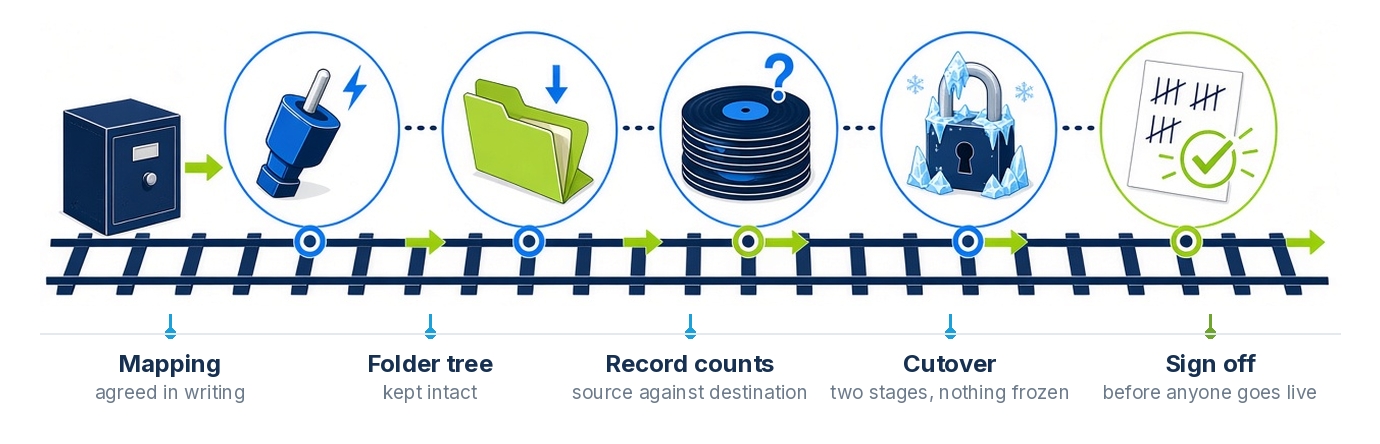
Ask for the mapping as a document, field by field, before anything moves. It should say where each source field lands, which ones are being dropped and why, and which ones need cleaning first. If a vendor will not produce that, they are planning to improvise.
2. The documents get flattened
This is the one that generates the most complaints in month two. Cases move across fine, and then somebody opens a matter with 380 documents and they are all sitting in one list, out of the folders the firm spent a decade organizing.
Technically nothing was lost. Practically, your team cannot find anything, and they start saving new documents to a shared drive because at least they can find those. Six months later you have a second document system nobody sanctioned.
The folder tree is part of the data. Treat it that way.
3. Nobody counted
Here is a question worth asking a vendor mid-project. How many contacts were in the source system, and how many are in Filevine right now?
If the answer takes more than a minute, nobody is counting, and the answer at go-live will be a shrug. Counts should be run at extraction, after load, and again at cutover, and they should be compared line by line rather than as a single total. A total that matches can still hide five hundred records that went to the wrong matter.
Every migration we run ships with a reconciliation report. Source counts against destination counts, field by field, document by document, with every exception listed and a reason next to it. Your team signs it before anyone goes live. It is also the thing you want on file if a client ever asks you to account for their complete record.
4. The firm gets frozen
The old approach was to stop work on Friday, move everything over the weekend, and hope. That is fine for a firm with sixty open files. It is not fine for a firm with active filed suits, because deadlines do not pause for your IT project.
A two stage cutover solves this. Move the bulk of the data while the firm keeps working in the old system. Then, at cutover, run a delta pass that picks up everything created or changed since the bulk load. The window where anyone is asked to stop working shrinks to a few hours instead of a weekend, and nothing that happened in between is lost.
5. Go-live is the first time anyone sees it
Training on a demo org with fictional clients does very little. People learn their own cases. If the first time your intake coordinator sees a real matter in Filevine is the morning it goes live, you have scheduled your adoption problem for the worst possible day.
Load into a sandbox first, with real data, and let the team work in it for a week. The complaints you get in that week are cheap. The same complaints after go-live are not.
How long it actually takes
For a firm of five to twenty users moving off a single system, four to eight weeks from kickoff to cutover is realistic. That assumes decisions come back within a few days and somebody at the firm owns the project. It stretches when the source data needs cleanup, when there are multiple source systems, or when the firm wants to redesign its processes at the same time as moving, which is a reasonable thing to want and should be planned as two phases rather than one.
Anyone quoting you two weeks is quoting a data dump.
What to send a vendor to get a real number
You do not need a discovery project to get a sensible quote. Send an export, or the database schema, plus rough counts of matters, contacts and documents, and the total size of the document store. That is enough for us to come back with a written field by field map and a fixed fee rather than a range with a footnote.
If you want to see the shape of the work first, our data migration page walks through what comes across and how we prove it, and the Filevine practice page covers the implementation side. Or just send us the old system and we will tell you what moves.